











DT PDF Editor for Windows
- Trial version
- 4
- 19
- V1.1.0
Download for Windows
View an ad to download for free

- Data TB Software
- More programs (4)
DT PDF Editor is a small, fast Windows PDF editor. Edit, merge, split, compress, redact, OCR, se
DT PDF Editor is a light, fast desktop PDF editor built for Windows 11, 10, 8.1, and 7, in both 32-bit and 64-bit versions. It is built around one simple idea: everyday PDF editing should not require a multi-gigabyte install, a slow background service, or a monthly subscription just to fix a typo or merge two files. The entire application is just 6 MB, needs only 20 MB of free disk space, runs on as little as 256 MB of RAM, and works completely offline for all core editing tasks. Despite the small footprint, it includes a full professional toolset for editing, organizing, securing, and automating PDF work, all inside one uncluttered sidebar.
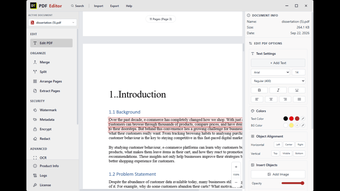
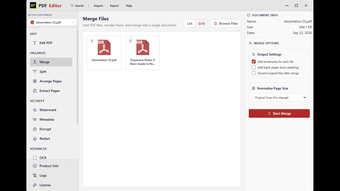
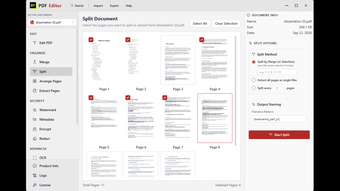
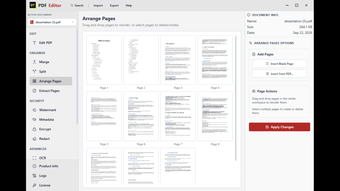
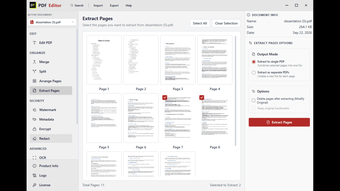
Users can click directly into any paragraph and edit the actual text, changing font family, size, weight, alignment, and color, instead of covering old content with a box. New text, images, and objects can be added anywhere on the page with control over placement and opacity, with automatic alignment snapping. Multiple PDFs can be merged into a single document with automatic bookmark generation, page size normalization, and optional blank padding pages for print. Files can be split by exact page range, by page count, by bookmark, or extracted page by page, with a custom output naming pattern for batches of generated files. Pages can be dragged into a new order, deleted, or pulled out into a standalone document without touching the original file.
Custom watermarks can be applied across every page with full control over font, color, opacity, rotation, and position on a 3x3 grid. Document metadata such as author, title, and creation date can be viewed and edited directly. Files can be locked with password protection, and sensitive content can be permanently redacted, meaning it is deleted from the document itself rather than just covered with a black box that leaves the original text recoverable underneath.
A built-in OCR engine converts scanned pages and image-based PDFs into searchable, selectable, editable text, turning old contracts, photographed forms, and printed receipts into normal digital documents. The compression tool reduces file size without noticeably affecting text or image quality, useful for email attachment limits or long-term archiving. A search tool finds every occurrence of a word or phrase instantly inside an open document. Pages or entire documents can be rendered out as PNG or JPG image files. Batch processing lets the same action, such as compression, watermarking, OCR, or rendering, run across an entire folder of PDFs in one job instead of repeating it file by file.
DT PDF Editor opens instantly and stays responsive even on older or storage limited machines, where heavier PDF editors tend to slow down or eat disk space with background processes. It is a strong fit for students and researchers merging chapters and reordering scanned material, small businesses preparing contracts and invoices, IT administrators deploying across machines with mixed specifications, and legal, compliance, and HR teams that need dependable permanent redaction and fast document search. Pricing follows Data TB's standard model of paying for the license period actually needed, with no forced annual subscription.
Compared to typical full-featured PDF editors, DT PDF Editor keeps the install small enough to set up in seconds, launches instantly instead of taking several seconds to load, and uses a low RAM and CPU footprint instead of running background processes when idle. It still covers the same depth of tools: editing, merging, splitting, arranging, extracting, watermarking, metadata editing, encryption, redaction, OCR, compression, search, rendering, and batch processing, without the heavier resource cost. System requirements stay modest: a 1 GHz processor, 256 MB RAM minimum, and 20 MB of free storage, so it performs reliably even on aging laptops where a multi-gigabyte PDF suite would struggle. No internet connection is required for core editing, making it genuinely offline-capable for people working with sensitive documents.
Loading…
App specs
Developer
- Data TB Software
- More programs (4)
License
Trial version
Version
1.1.0
Latest update
Platform
Windows
OS
Windows 11
Language
English
Downloads
19
Last month's downloads
- 19
Size
7.58 MB
DT PDF Editor for PC
- Trial version
- 4
- 19
- V1.1.0
Download for PC
View an ad to download for free
User reviews about DT PDF Editor
Have you tried DT PDF Editor? Be the first to leave your opinion!
Add reviewTop downloads Productivity for Windows
Top downloads Productivity for Windows
Top downloads Productivity for Windows
Related topics about DT PDF Editor
Latest articles

Assassin’s Creed Black Flag Resynced: New Game Plus hits PS5 next week

Apple Music now hides a playable iPod on its website: there’s Breakout too

Red Dead Online Halloween event is back: Dead of Night returns with 4x rewards

Clayface’s Aaron Paul cameo: why he appears only briefly

Apple iPhone Duo goes on sale: its first foldable hits stores
Laws concerning the use of this software vary from country to country. We do not encourage or condone the use of this program if it is in violation of these laws. Softonic may receive a referral fee if you click or buy any of the products featured here.